A few weeks ago, I posted about how I go From Spoken Thoughts to Connected Notes My Voice Journaling Workflow. I made a minor improvement to that process.
The Google Drive app was flaky and sometimes wouldn’t synchronize all files to my laptop.
Looking through the other option to share files in the Voice Record Pro app, I decided to try AirDrop:

That was a better option:
- The files always end up on my laptop
- They don’t have to go up to Google Drive and then down to my laptop
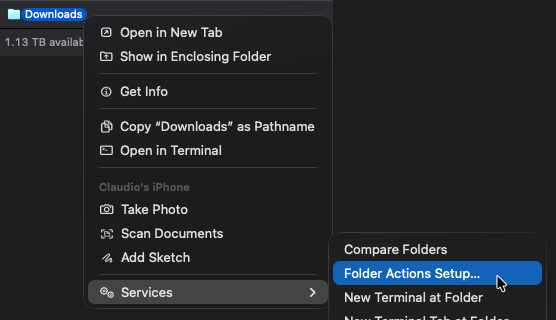
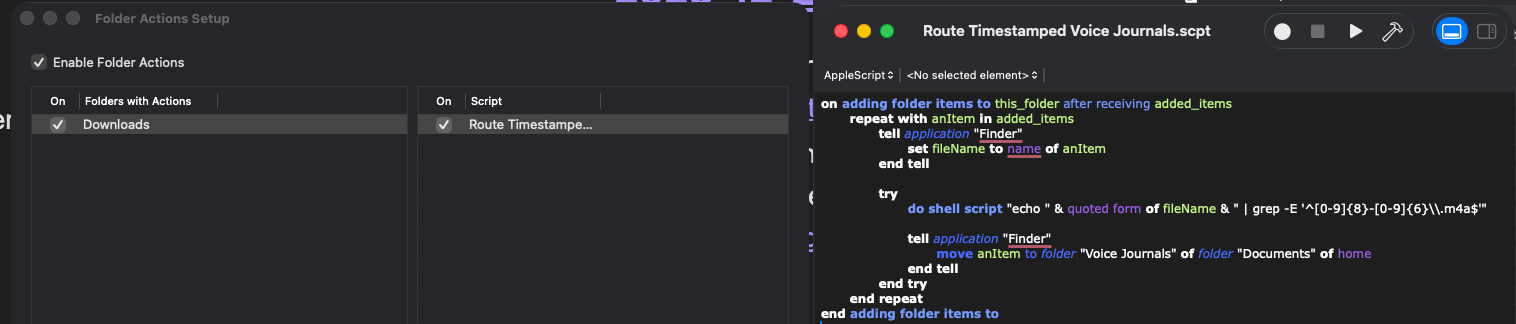
Files from AirDrop go to the Downloads folder, but I want them moved to a “Voice Journals” folder. I prompted ChatGPT, and it helped me complete the task by leveraging Mac’s Folder Actions feature and a script to move files matching the expected naming pattern.
The “Folder Actions Setup…”
…and the script that ChatGPT created for me…
This change has been working well for over two weeks now.




Leave a Reply