As I’ve mentioned before (here, here, and here, at least), I’m very specific as to how much stuff I want to see on my screen as I’m working with code. Visual Studio can be very cluttered depending on how we set it up; so much so that sometimes I feel like just open my cs files in Notepad!
One of the things I think get in my way is the feature CodeLens in VS. While it does provide good information and access to useful things, I hate it being on my face all the time! I rather it only show me the goodies when I need it.
Gladly, I found information on this link that shows how I can create a shortcut to toggle CodeLens on and off (I’ve also found out about the Visual Commander extension, which I hadn’t seen before).
One thing in that post that wasn’t clear is the name of the command I need to bind the shortcut to. I thought it’d be the name of the command I created in Visual Commander, but that wasn’t the case. Editing the command in Visual Commander, I noticed Command01 right before the name I gave to the command:
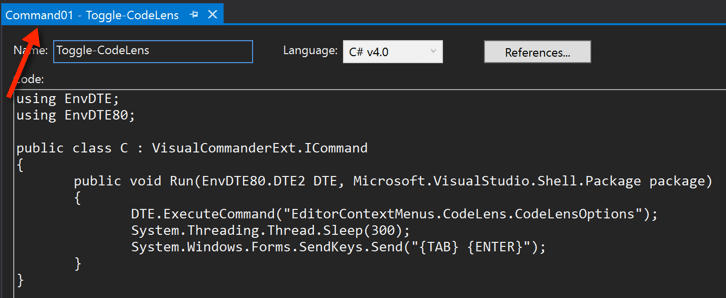
And that’s what I needed to look for in the Keyboard dialog in VS:
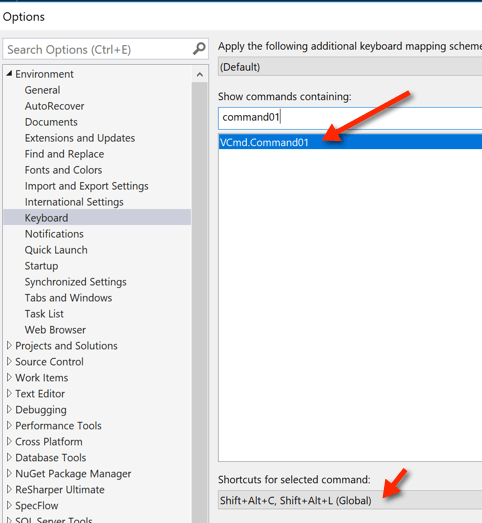
I’ve bound the command to the Shift+Alt+CL shortcut (for CodeLens).
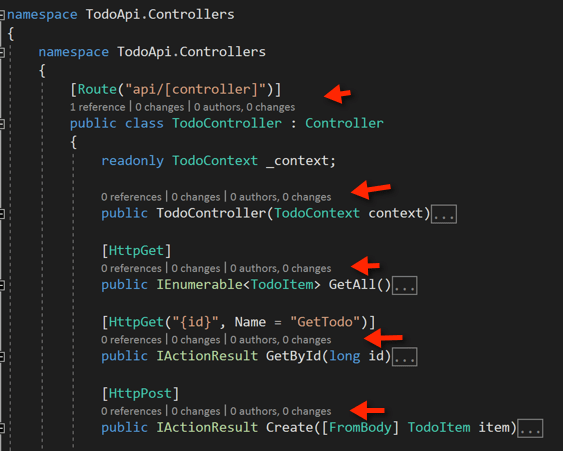
Now, if I toggle the feature On, I see all of the extra stuff it shows me:
Otherwise, I get to focus only on the code (which is what I want 98% of the time!):

The less stuff there is mingled in the code, the easier it is for me to read and understand it.



Leave a Reply to Switching Windows Layouts in Visual Studio 2017 | Claudio Lassala's BlogCancel reply