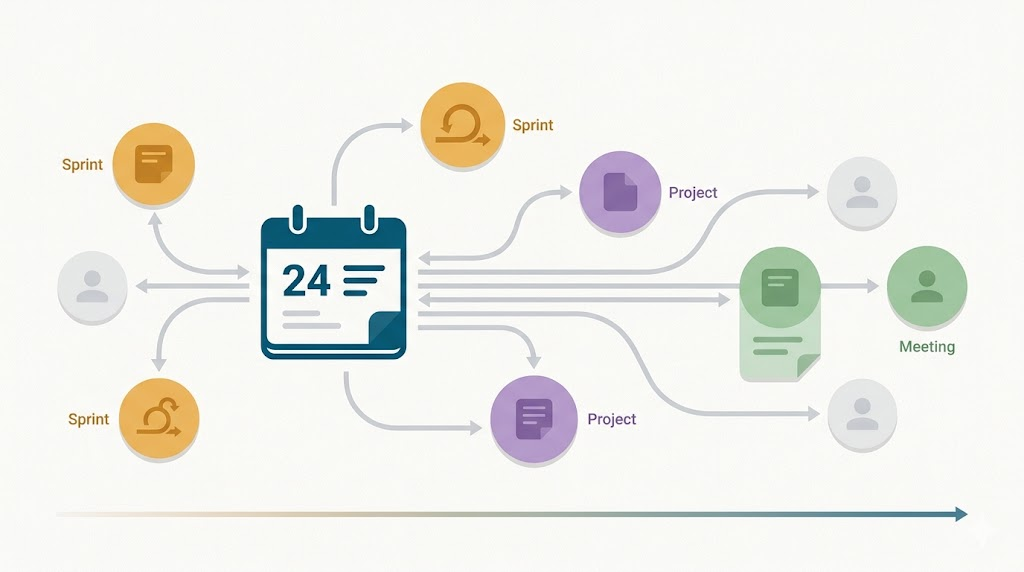
I was showing a colleague my Obsidian setup the other day, and I realized something I hadn’t articulated before. My daily notes aren’t just a log of what happened. They’re the temporal navigation layer for everything else.
Sprint Notes Link to Days, Not the Other Way Around
Here’s what I mean. I have a note for Sprint 15. At the bottom, there’s a daily log section. Each day gets a subheader that links to that day’s daily note:
## Daily Log

### [[2026-04-24]]

- Worked on seller inventory information
- Pipeline work
- KT session
The sprint note doesn’t contain the day. It links to it.
When I’m looking at the sprint, I can see the rhythm of the work. When I click through to the day, I see everything else that happened: other projects, meetings, random thoughts. The local graph view shows me the full context of that moment.
Project Notes Do the Same Thing
Any big feature I’ve been working on has its own note. At the bottom, there’s an activity log:
## Activity Log

### [[2026-04-18]]
- Initial modeling session

### [[2026-04-22]]
- Implemented core logic
Natural Language Makes It Frictionless
I use a plugin called Natural Language Dates. When I’m adding to my sprint log or project activity log, I just type @today, @yesterday, or @tomorrow, and it creates a link with the correct date format.
It sounds trivial, but it removes the friction. I don’t have to think about formatting. I don’t have to look up what day it is. I just type @today and keep moving.
Link First, Create the Note Later
This is the practice that took me a while to internalize. When I’m taking notes in a meeting, and someone mentions Jane Doe, I’ll type [[Jane Doe]] even though that note doesn’t exist yet.
Later, when I have more context or when I realize I’ve referenced that person multiple times, I’ll click the link and create the actual note. But I don’t wait. I link first.
The tool shows me which links are orphaned. I can decide later whether they’re worth expanding or were just passing references.
Even more important, I do the same with concepts; I link them in the notes and expand them later.
What This Looks Like After Three Years
I’ve been using Obsidian for almost four years now. This structure evolved slowly. I didn’t start with a grand plan. I started by dumping notes into the root folder and letting patterns emerge.
The daily note, as a hub, emerged because I kept asking myself, “When did I work on that?” The answer was always a date. So dates became the anchor.
Sprint notes and project notes link to days because that’s how I think about work. I don’t think, “What sprint was that in?” I think, “When did I do that?” Then I navigate from the day to the sprint or project.
Why This Works
Most networked thought tools talk about building a second brain or creating a knowledge graph. That’s fine, but it’s abstract. This is concrete.
I have a temporal layer (daily notes) and a topical layer (sprints, projects, people, concepts). They’re connected through bidirectional links. The daily note is the hub because time is the one dimension I can always anchor to.
I don’t have to remember which folder something is in. I don’t have to maintain a complex taxonomy. I just have to remember roughly when I worked on it. From there, the links take me where I need to go.
If the concept, project, or person comes to mind first, I can find their notes and, from there, the relevant dates.
It’s Not About Organization
People see this and think I’m organized. I don’t see it that way. I’m not trying to keep things tidy. I’m trying to make it easy to find what I need when I need it.
The structure serves retrieval, not storage. That’s the shift. I’m not filing things away. I’m creating a navigation system that works the way I think: through time, through topics, through connections.



Leave a Reply