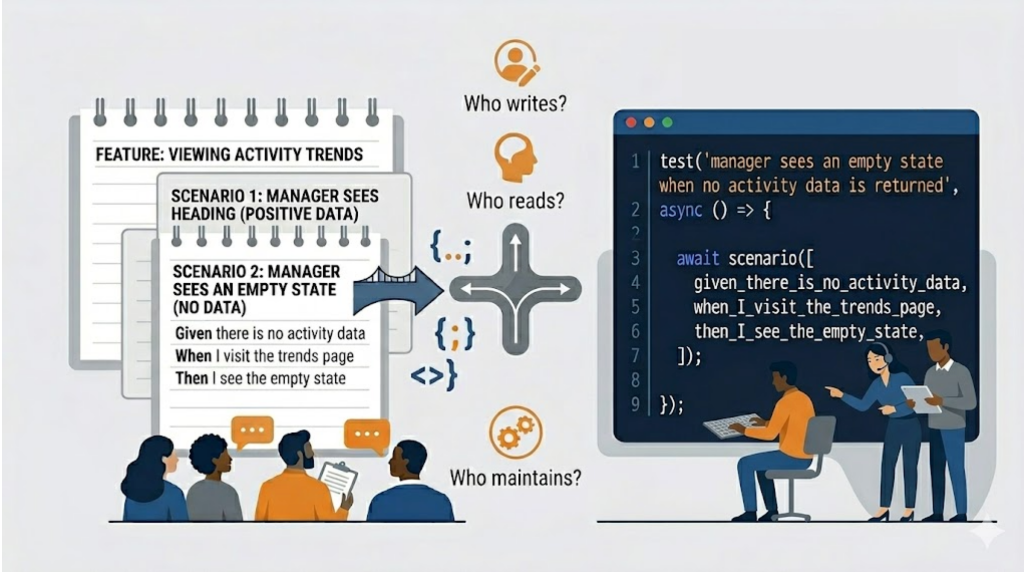
People see the way I write tests and ask about BDD tools.
When I’m writing tests in C#, Jest, or Cypress using my Given-When-Then structure, someone inevitably asks: “At that point, shouldn’t you be using ‘insert BDD tool name here’?” Or any of the other BDD tools that let you write plain English in a text file, then map those sentences to code through regular expressions.
It’s a fair question. And the answer isn’t about which tool is better. It’s about what we’re optimizing for.
The Questions That Matter
I’ve learned to ask:
-
Who is writing the tests?
-
Who is reading the tests?
-
Who is maintaining the tests?
The answers to these questions tell me which tool to reach for.
When Plain English Files Make Sense
If non-technical people are writing the user stories and acceptance criteria in Given-When-Then format, if they’re the ones reading and maintaining those specs, then yes, use tools optimized for that workflow.
The product owner or business analyst writes the scenarios in plain English. Developers write the automation layer in TypeScript, Ruby, Java, C#, or whatever language the tool supports. Everyone works in their native language.
That separation has value when the people closest to the business logic aren’t developers.
When Developers Are the Primary Audience
But if developers are the ones writing, reading, and maintaining the tests, the calculus changes.
At that point, maintaining separate text files with English sentences and then writing the automation layer in a programming language might just be extra work. It doesn’t yield enough value if developers are already comfortable reading code.
Writing tests in C# or TypeScript, while still resembling English, is a good compromise. Developers can read the specs in something close to plain language, but they’re already in the programming language where they’ll implement both the automation and the feature itself.
We get the best of both worlds. The semicolons and curly braces are there, but so are the words in English. It’s readable enough to bring non-technical stakeholders into the conversation when needed, while being optimized for the people who will maintain it.

When Even That Isn’t Enough
Sometimes I have more complex scenarios that need verification. The standard test framework syntax starts to feel clunky.
That’s when I build internal domain-specific languages. Small DSLs that let me write tests in a way that’s optimized for me as a developer to write, read, and maintain, while also outputting human-readable documentation if needed.
I can have both: tests that are easy for me to work with, and generated documentation that’s easy for others to read.
The Real Decision Factor
The choice of tool comes down to this: make it easy for the people doing the work.
If non-technical people are writing and maintaining specs in plain English, use the tool that’s most optimized for that. If developers are doing that work, optimize for the developer experience.
It’s not about which tool is more “proper” or more aligned with BDD principles. It’s about reducing friction for the people who will live with these tests every day.
I’ve seen teams adopt BDD tools because they felt they “should,” only to have developers maintain both the English files and the code bindings, with no one else ever reading the English files. That’s a ceremony without benefit.
I’ve also seen teams skip BDD tools when they actually had product owners eager to write scenarios, forcing those non-technical people to learn to read code. That’s a missed opportunity.
The tool should serve the team, not the other way around.





Leave a Reply