
When a colleague asked me how I keep track of multiple calendars, I could see the question forming: “Which tool do you use to sync them all?”
I don’t.
I rejected every automated calendar sync solution I looked at. Instead, I manually consolidate everything into Obsidian. The meeting invite comes into MS Teams. I get the notification. I open Obsidian and add it to my Full Calendar plugin. That’s it.
This sounds backward. Why would anyone choose manual over automated in 2026?
Note: while this post mentions Obsidian as the tool, the system and process have been mostly the same for a very long time, with different tools used (before Obsidian, I used Evernote for a long time).
Control Over Convenience
I work across three main calendars: Client, Improving, and my personal schedule. Each one lives in its own system. Each one sends notifications to Teams or Gmail.
Conventional wisdom says to find a tool that automatically pulls them all together. Keep everything in sync. Let the software handle it.
But here’s what I learned: I don’t want them in sync. I want them in my system, on my terms.
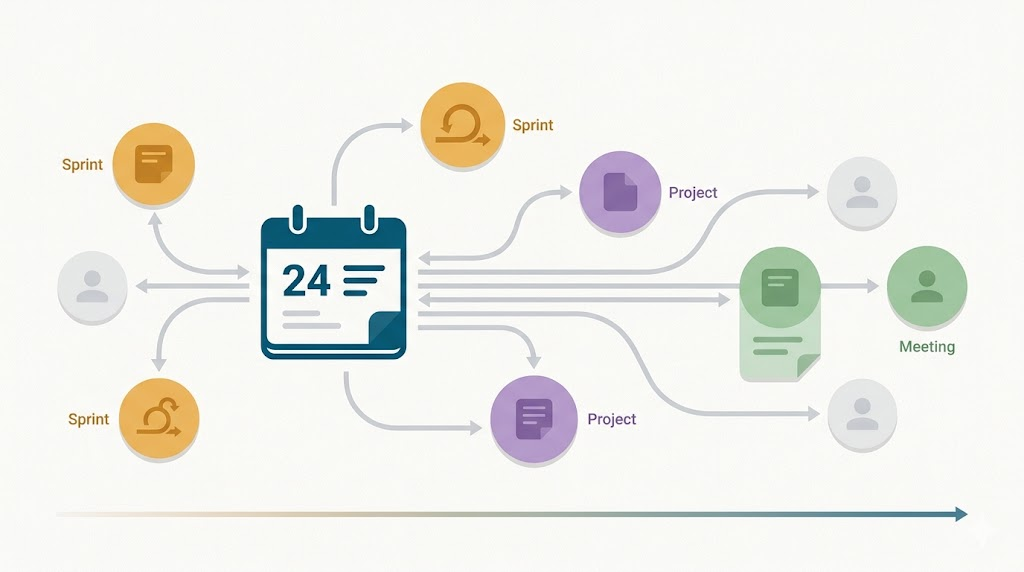
When a meeting invite arrives, I see the Teams notification. I look at it. I open Obsidian and create an entry in Full Calendar. I assign it to the right color-coded calendar. Client gets one color. Improving gets another. Personal gets a third.
This takes maybe 30 seconds. But those 30 seconds force me to acknowledge the meeting exists. To consider whether I need to prepare for it. To see how it fits into my week.
Automated sync would save me those 30 seconds. It would also remove the moment where I consciously decide what belongs in my planning system.
The “No Meetings Day-Of” Boundary
I have a rule: no meetings drop on my calendar the day they’re scheduled.
This isn’t about being difficult. It’s about how I plan my work.
I plan my days the evening before. I plan my week on Saturday or Sunday during my weekly review. When I sit down on Monday morning, I already know what meetings I have on Tuesday, what preparation they need, and how they fit into my other work.
A meeting that appears on Tuesday morning breaks that system. It means I’m reacting instead of planning. It means I haven’t had time to think about what I need to bring to that conversation.
So when someone tries to schedule something same-day, I have the conversation. I explain that I work ahead. I need time to prepare. That dropping meetings on my calendar disrupts how I structure my days.
Most people understand once they hear the reasoning.
Weekend Planning, Evening Reviews
Saturday morning, I open Obsidian and look at the week ahead. I see what meetings are coming. I check my sprint notes. I review what I committed to.
For each meeting, I ask, “Do I need to prepare for this?” In some meetings, I just show up. Others need research, or pulling up specific information, or talking to someone beforehand.
If preparation is needed, I schedule time for it. “Tuesday morning, review Project XYZ notes before the 10 am meeting.”
Sunday evening, I look at Monday. I see the meetings. I see the preparation I planned. I make sure I have everything I need so I don’t have to scramble.
Monday evening, I look at Tuesday. Same process.
This rhythm only works because Obsidian is my source of truth. Not Teams. Not Outlook. Not Gmail. Those systems send me notifications. Obsidian tells me what I’m actually doing.
Tracking Professional Development Activities
Here’s a practical detail that matters: when I create a meeting note in Obsidian, I add a boolean property called eip_reported.
At Improving, we track professional development activities through an Employee Involvement Program (EIP). Speaking engagements, networking events, Learning Circle sessions—they all count. If a meeting qualifies, I set that property to false. It sits there, waiting.
On Friday or Saturday, I run a query that shows me every calendar entry where eip_reported is false. I go through the list. I log each one in our internal system. Then I open the note and flip the property to true.
This takes maybe five minutes a week. But it means I never forget to report something. I never have to remember which meetings count and which don’t. The system remembers for me.
Could I automate this? Probably. But the five minutes of manually reviewing the list keep me aware of what I’m actually doing. It’s another moment of intentional reflection built into the system.
Why Manual Beats Automated
The counterintuitive part is that manual consolidation gives me more control than automation ever could.
With automated sync, I’d have every meeting from every calendar showing up in one place. Great. But I’d lose the filtering step. The moment when I decide what actually matters.
I’d lose the preparation step. The Saturday review, where I look ahead and think about what each meeting needs.
I’d lose the professional development tracking. The Friday ritual where I review what I did and make sure it’s documented.
Automation optimizes for convenience. Manual consolidation optimizes for intentionality.
I’m not trying to save time on everything. I’m trying to stay in control of how I spend my time.
The Full Calendar Setup
Technically, this is simple. I use the Full Calendar plugin in Obsidian. I’ve set up multiple calendars with different colors. When I create a new event, I assign it to the right calendar.
Each event is a markdown note. I can add properties to it. I can link to other notes. I can write preparation notes directly in the event.
When I click on a day in the calendar, I can create a note for that day using my note template. Everything connects. The calendar shows me meetings. The event note shows me what I planned to work on. The sprint note shows me what I committed to. The daily note brings them all together.
It’s all markdown. It’s all searchable. It’s all under my control.
What This Actually Costs
Let’s be honest about the overhead.
When a meeting invite comes in, I spend 30 seconds adding it to Obsidian. If I get five meeting invites a week, that’s two and a half minutes.
Saturday morning weekly review takes maybe 30 minutes. Sunday evening and weekday evening reviews take maybe 10 minutes each. That’s about an hour and a half a week total.
Friday’s professional development review takes five minutes.
So we’re talking about two hours a week, give or take.
What do I get for those two hours? I know what’s coming. I’m prepared for it. I’ve thought about how it fits into my other work. I’m not reacting to my calendar. I’m using it as a tool.
Two hours a week to stay in control of my schedule seems like a reasonable trade.
Not for Everyone
I’m not suggesting everyone should do this.
If your calendar is packed with back-to-back meetings all day, manual consolidation probably doesn’t make sense. You’d spend more time managing the system than using it.
If you don’t plan ahead, if you prefer to react to what comes up, this approach would feel like unnecessary friction.
But if you’re someone who plans your week in advance, who wants to prepare for meetings rather than just show up, who values control over convenience, this might be worth trying.
Start small. Pick one calendar. Try manually adding entries to Obsidian for a week. See if the act of consciously deciding what goes into your planning system changes how you think about your time.
You might find, like I did, that the “inefficiency” of doing it manually is actually the point.



Leave a Reply to Lawrence JonesCancel reply