
I was once brought in to consult on the architecture for a logistics company whose software had to run around the clock. Ships do not wait. Trucks do not wait. If the system goes down, the operation backs up in minutes.
The client asked me a question I still appreciate: “We want to build something that, ten years from now, we are still proud of. And when changes come, we want to feel comfortable making them without saying, ‘Oh no, now we have to rewrite everything.’”
That question shaped every decision we made.
Building the boundary first
We designed the system as a classic three-tier application. Front end, back end with the business rules, data access layer, database. That sounds standard now, but for teams coming from FoxPro it was a discipline. In FoxPro, the easiest thing in the world was to open a table from the UI, read some data, and put it on a screen. It was also the thing that made every future change painful.
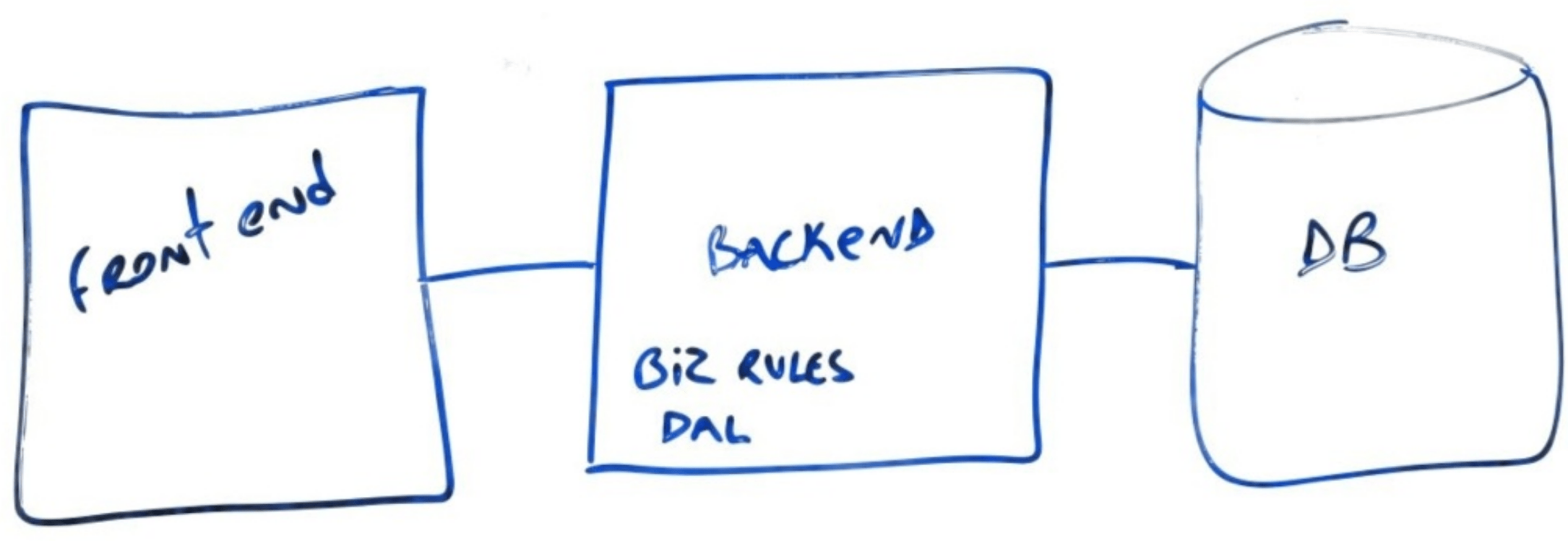
So we made a hard rule: the front end would never touch the database. It would send XML to the back end and receive XML back. That was the entire contract. The front end did not know if the data came from FoxPro, from SQL Server, or from a temporary file on a server. It knew the shape of the request and the shape of the response.
That boundary was expensive to enforce at first. It felt like bureaucracy. But it was the reason the system could evolve later without falling apart.
The first rewrite: only the front end
About ten years in, the company wanted to give users a better experience. The biggest pain point was reports. Users would click a report, wait five minutes while the application froze, and go get coffee. While the report ran, they could not do anything else in the system.
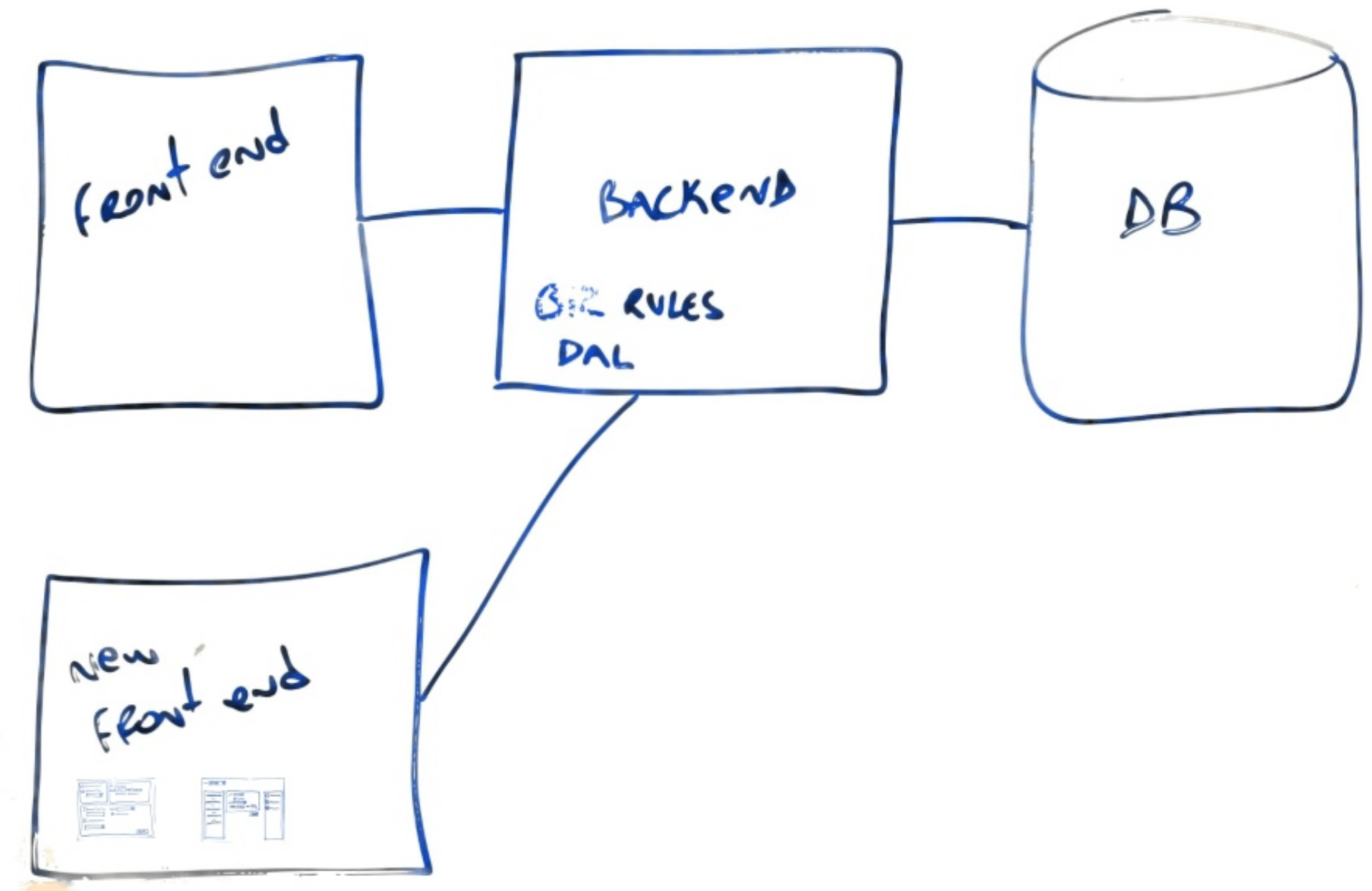
Because a stable XML contract separated the front end and back end, we did not have to rebuild the whole system. We only had to rewrite the front end. We chose WPF because it handled multithreading well. Then we focused on the one thing users actually complained about: running reports.
The old FoxPro application had hundreds of report screens. They were scattered across menus with no clear organization. Each screen had a pile of controls with complicated enable-disable logic: click this checkbox, enable that dropdown, pick a value, enable a date range, click Run, get a different report depending on the combination. The developers could not explain the logic. The users could not discover it.
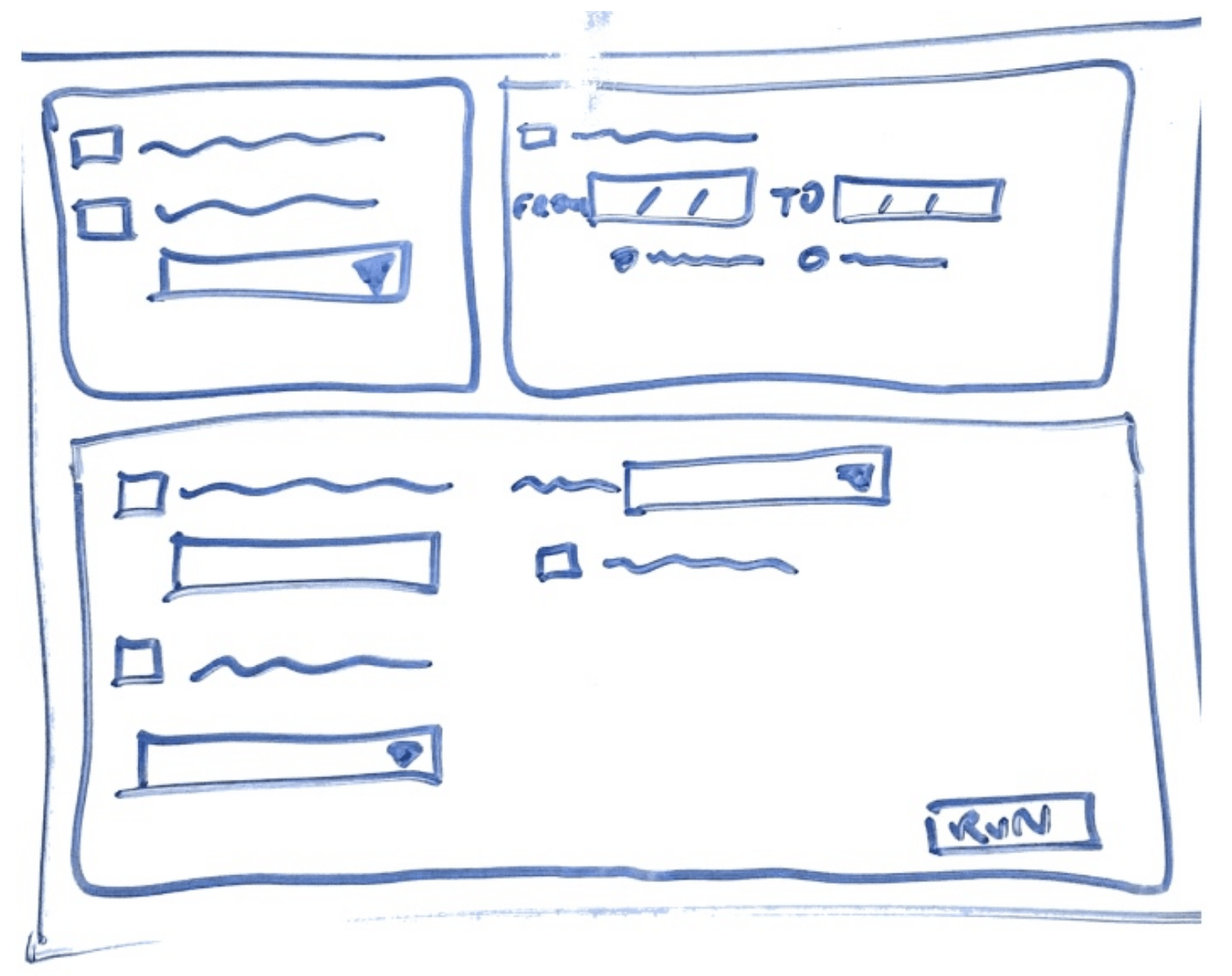
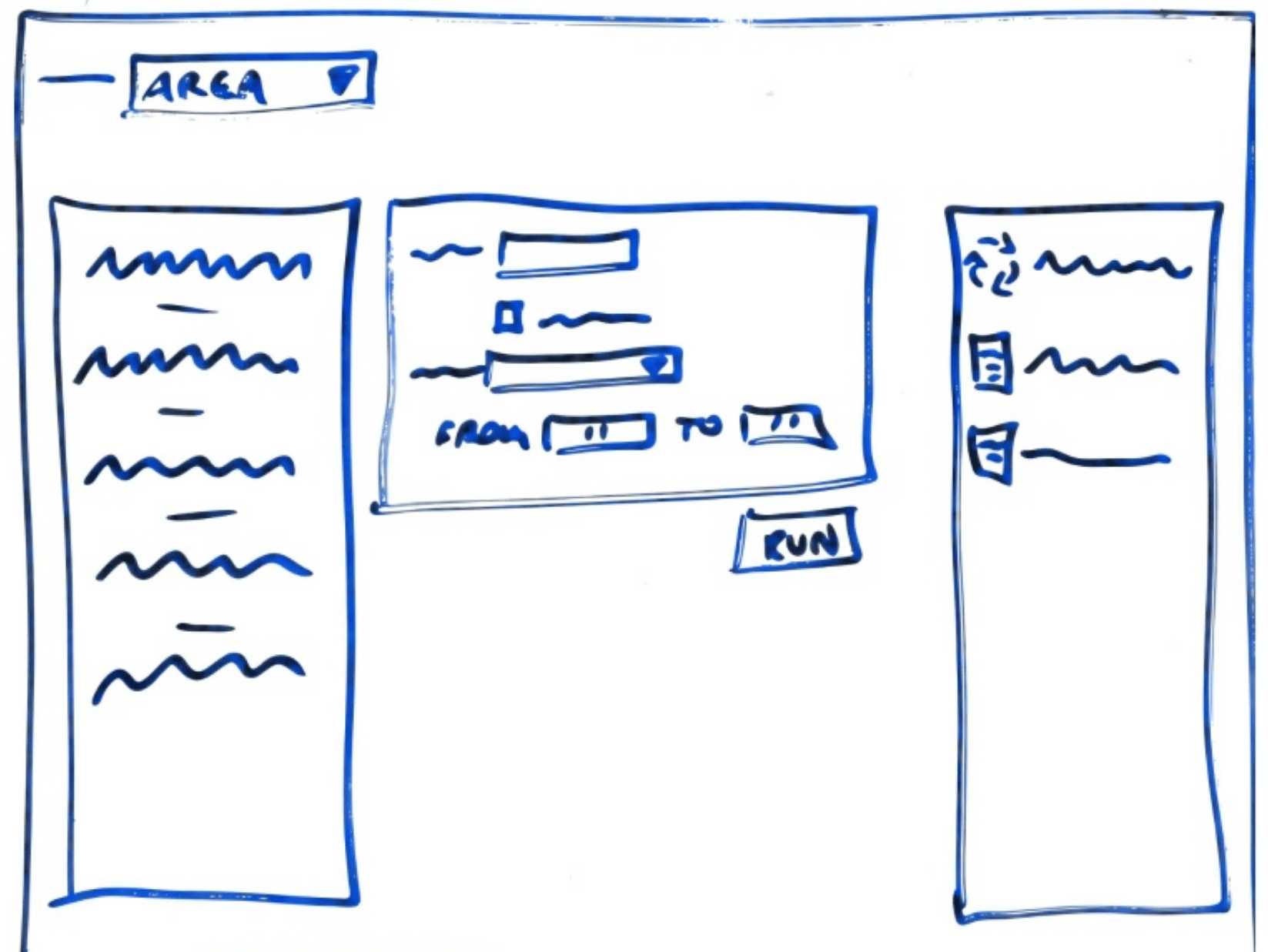
We replaced all of that with one screen.
This was a reports hub, not a replacement of the whole application. The rest of the system still ran on the same FoxPro back end and the same data; we were only collapsing the report explosion into one place. A later project with another client would show me what happens when you apply the same one-screen idea to the entire application, but that story comes later.
One screen, many reports
On the left, a list of reports filtered by role. Accounting saw accounting reports. Human resources saw their reports. If a user had fifty reports to choose from, they could filter by area or mark favorites. Some users ran the same three reports every morning, so we let them group those favorites and run them all in the background with one click.
In the center, the criteria for the selected report. No more enable-disable puzzles. If a report needed a customer name, a date range, and a yes-no flag, the screen showed exactly those controls. When the user selected a different report, the criteria changed to match.
On the right, a queue of running reports. When a report finished, a toast message asked if the user wanted to view it. They could leave the screen, do something else, and come back when the report was ready.
We put it in front of users without training. They figured it out by clicking. The developers did not have to maintain the old enable-disable logic anymore, because it no longer existed. Adding a new report meant creating a class that described the report: name, layout file, criteria fields, role. The application picked it up automatically. That is the open-closed principle in practice, and I wrote more about that idea recently in A Menu System Built for Change, Not Just for Now.
The next replacement: the database
A few years later, the company decided to move the database from FoxPro to SQL Server. Because the front end only knew the XML contract, we did not have to change a single screen. The data access layer changed. The database changed. The UI had no idea.
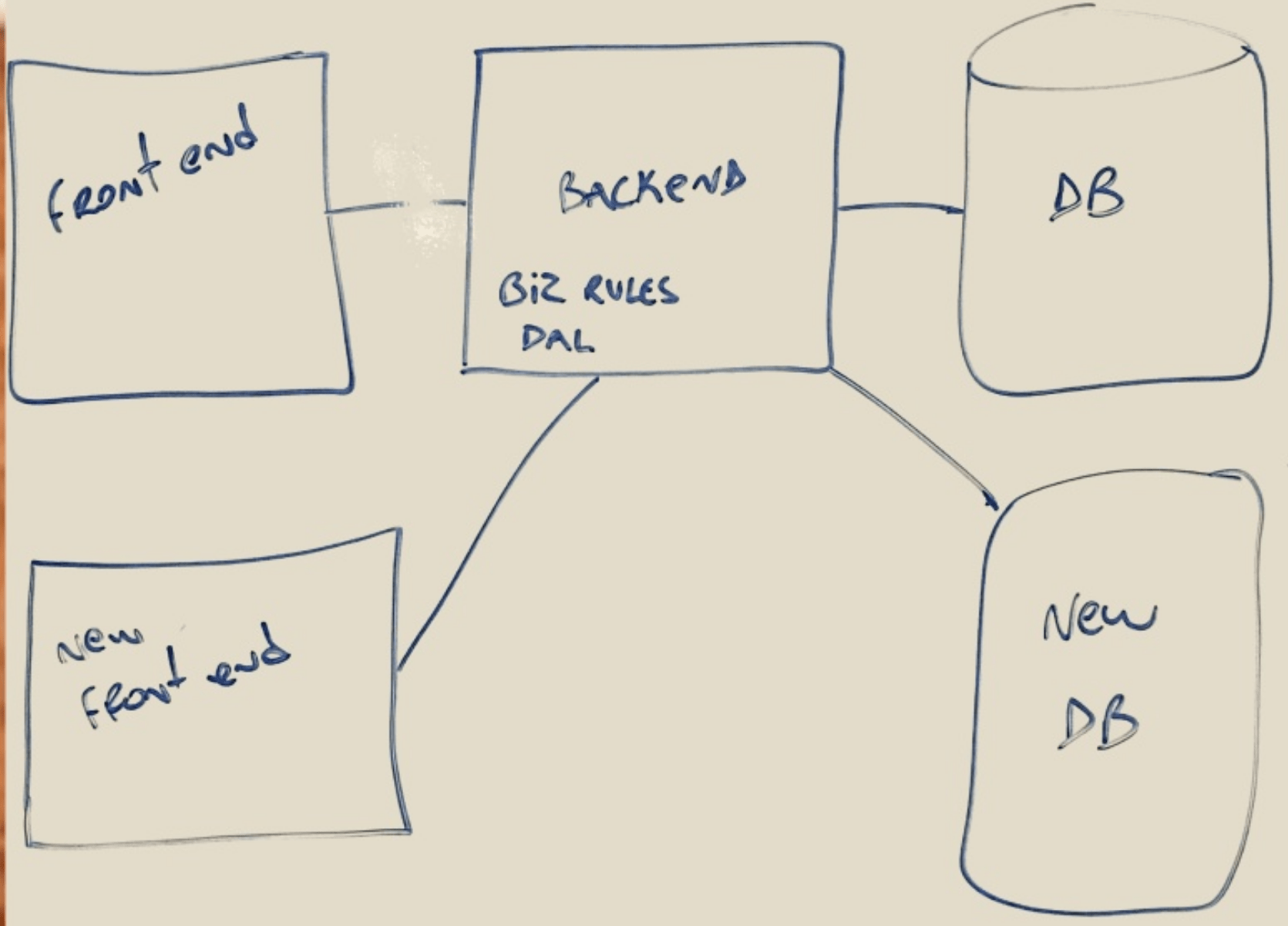
Then came the business logic. They wanted to take advantage of .NET for multithreading and scaling. We could not shut the system down for a migration. It was still running 24/7. So we rewrote the slowest endpoints one at a time, running the old FoxPro back end and the new .NET back end in parallel.
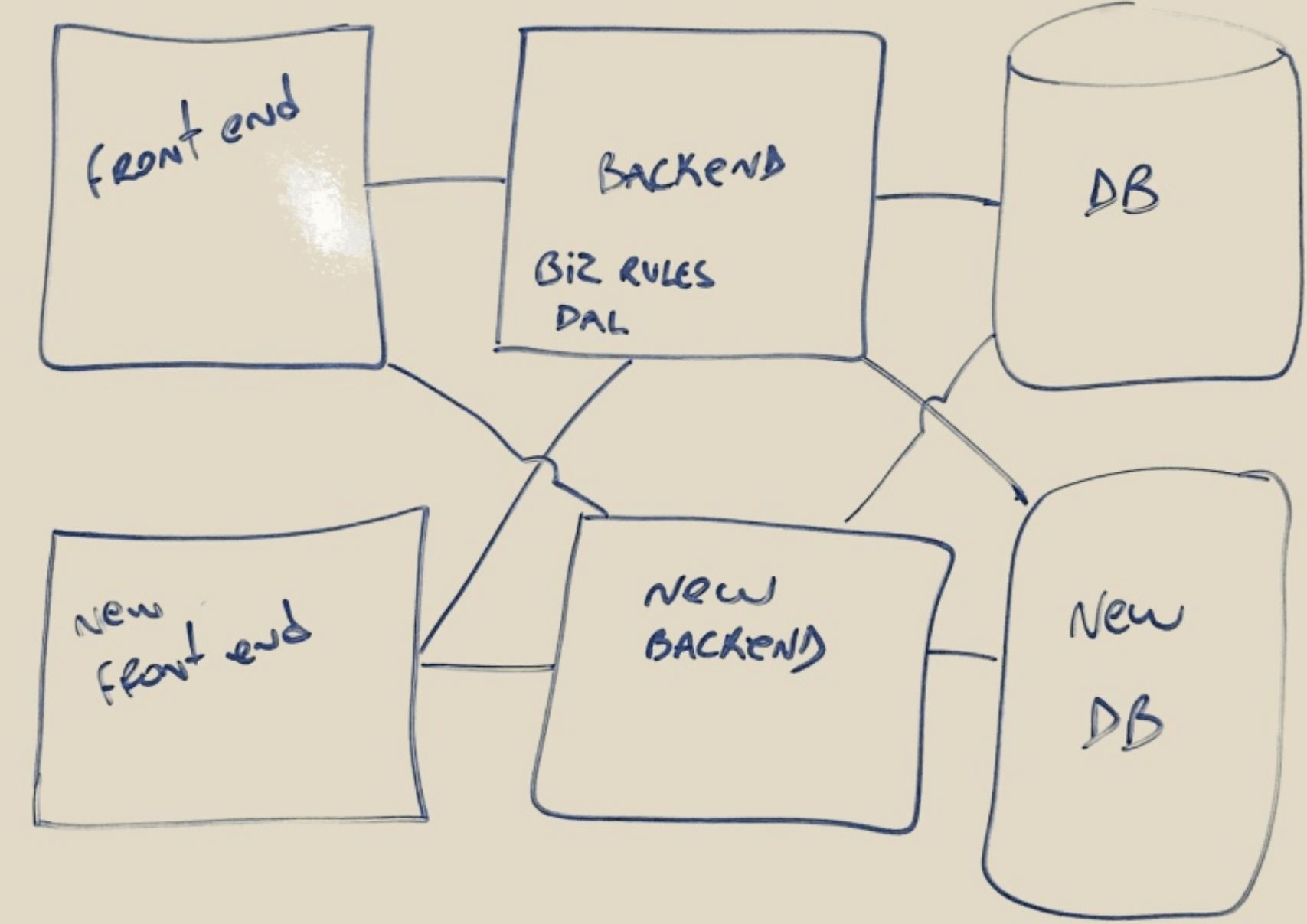
This was the seamless end of the spectrum I described earlier. There was no hard cutover on a single date. We put a proxy in front. The front end sent its request to the proxy, and the proxy routed it to the old or new endpoint. We compared outputs. When we were confident the new one matched, we cut the old one. To the users, the system kept running the same way it always had. Underneath, the engine was being replaced while the plane was still flying.
Why this worked
The reason the whole sequence worked is that the architecture separated the things that change at different speeds. The front end changes because users want new experiences and devices keep changing. The back end changes because the business needs more throughput or a better runtime. The database changes because the storage technology improves. If those layers are tangled, every change becomes a rewrite. If they are separated by contracts, each layer can be replaced independently.
I have written about this before. In All Front-End Development Technologies Will Soon Perish I argued that front-end technology is the most perishable part of any stack. This project is the proof. The WPF front end eventually needed replacing too, but the back end and data outlived it because they were not mixed together.
In Beyond Front-End and Back-End: What Developers Really Need Now I said the real skill is understanding the people and the problem well enough to draw the right boundaries. Contracts between layers are a way to respect that understanding.
The lesson
The client asked for a system they could still be proud of in ten years, not a rewrite. We got there by building the application so every future change could be small, not by building the perfect application on day one.
That is the opposite of the big-bang rewrite. It is also the only kind of rewrite I have seen work when the system cannot stop moving.
This is a post in the series “The Software Does Not Work – Rewrite It: Lessons from Two Decades of Replacing Legacy Software.”
- The Software Does Not Work – Should We Rewrite It?
- The Floppy Disk Handoff: When the Source Code Lies to You
- A 24/7 Operation: The Rewrite That Didn’t Need to Stop the World – This post
- 500 Screens, One Idea: What Users Actually Need
- There Is No Domain (Yes, There Is): Pipeline Inspections and the Dynamic App
- Why Calling FoxPro Forms from .NET Hurts
- When Silverlight Died, We Didn’t: The Thin UI Bet
- Excel in the Browser: A Rewrite That Never Launched
- A Year and a Half Without a Database
- What I Still Believe About Software Rewrites


Leave a Reply