A user story that sounds finished
At a sprint planning years ago, a teammate read this user story out loud during backlog refinement:
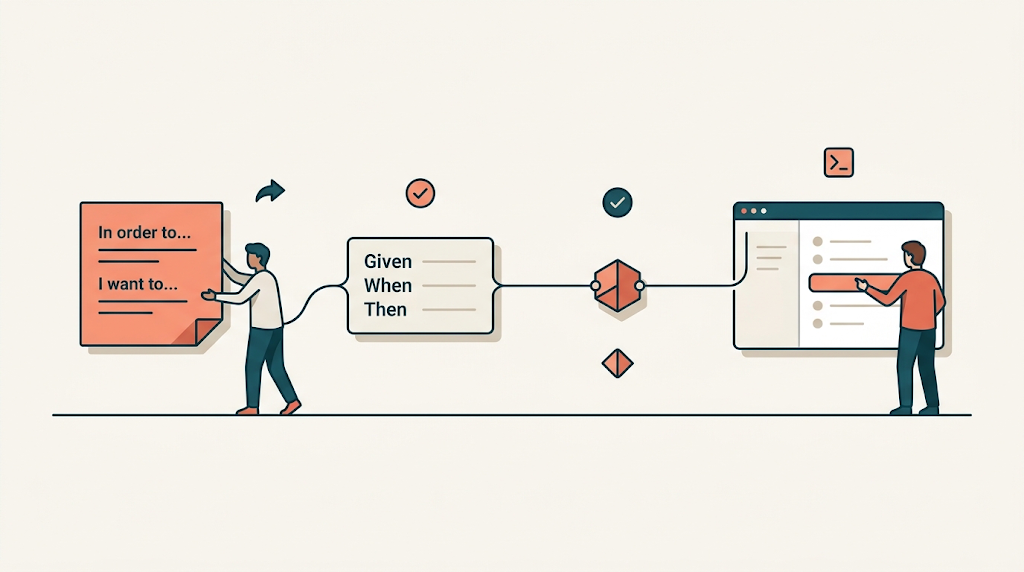
In order to quickly navigate through sales orders As a salesperson I want to see a list of all existing sales orders
Everyone nodded. It was short and looked like a complete slice of work. Most developers would find that an easy story to implement: write a query that selects every sales order and dump the result into a grid. Done.
But the story skips the need and jumps to a solution.
“Quickly navigate” toward what? The phrase “all existing sales orders” covers tens of thousands of records across many years. Maybe the salesperson is scanning a grid. More likely, they are helping a specific customer on the phone. The original story leaves out the context that tells us what to build.
A more expressive version of that story looked like this:
In order to better assist the customer on the phone and move on to the next call As a salesperson working at my desk I want to quickly see that customer’s open and pending sales orders.
That is a different request. The user is on the phone, not walking through a warehouse. They are at a desk with multiple screens, so the UI can show more information. The list is scoped to one customer and filtered to open and pending orders, because nine times out of ten the caller wants to place, change, or check on an order that is not already closed. We got there by asking why a second time.
Why one more time changes everything
Every technique depends on that extra why.
Anticipate and compensate starts with knowing what the user is trying to finish. Explore safely starts with understanding the real impact of the action. Navigate by intent, speak human, and take what users have all require knowing who the human is and what they are holding in their hands.
The fiscal-year close workflow, the warehouse lot-adjustment workflow, and the sales-order story all pull the same thread. The sales-order story shows how asking why again turns a generic grid into the right information at the right time.
From story to test
A good user story should drive the user experience, the code, and the tests. That is why I use Given-When-Then for this. I have written about why I prefer Given-When-Then over Arrange-Act-Assert and about GWT everywhere as a shared language for tests and specs. The reason is simple: when a test describes the user’s outcome, it does not lock us to a specific button, dropdown, or toast message.
Take the lot-adjustment example I often use. We wrote the end-to-end test in Cypress first, and I later moved similar suites to Playwright. I wrote about that move in From Cypress to Playwright: BDD and the Loop That Closes. The tooling changed, but the shape stayed the same. A warehouse worker notices damaged stock and needs to update the system. A story like “as a warehouse worker I want to edit the lot table” misses the point. A better one is “as a warehouse worker I want to adjust the quantity of a lot using the number I already counted.” That story produces a test like this:
Given the list of inventory lots
When I select to adjust a lot
Then I see the lot adjustment screen

When I indicate "increase quantity by 10"
And I select the adjustment reason "Damaged"
And I enter the comments "broken cases found"
And I confirm the adjustment
Then I see a confirmation message
Notice what is missing. It says select, confirm, see. It does not say “click the Adjust button,” “select from a dropdown,” or “wait for the toast to appear.” The test describes the experience, not the widgets.
This matters because the UI can change without the test breaking. Add a keyboard shortcut. Scan a barcode. Make the confirmation a modal instead of a banner. The behavior stays the same, so the test stays useful. This is the difference between testing the user’s outcome and testing the implementation.
The same contract on both sides
The task lives on both the front end and the back end, expressed through the same AdjustLot contract. In the Angular application, the model that collects the worker’s input looks something like this:
export interface AdjustLot {
lotId: string;
method: 'increaseBy' | 'decreaseBy' | 'adjustTo';
quantity: number;
reason: string;
comments?: string;
}
On the .NET back end, the command that receives that request looks like the same idea in a different syntax:
public record AdjustLot(
Guid LotId,
AdjustmentMethod Method,
decimal Quantity,
string Reason,
string? Comments);
It omits the full lot entity and most warehouse columns. It keeps only the minimum information the worker needs to complete one task. Because the model is small, the UI, the test, and the API validation stay small. The code on both sides stays clean.
A worker can increase by, decrease by, or adjust to a number because those are the three ways they think about the count. They are running across the floor with people yelling questions at them. They do not want to do math. If they count five boxes left, they say “adjust to five.” If they found a damaged pallet, they say “decrease by one.” The model matches the information they actually have.
The loop closes here
Good user stories lead to Given-When-Then tests. The tests point to task-based models. The models become API contracts. The contracts shape clean code on both sides. That is the chain from user stories to GWT tests to clean code.
When the chain holds, the user gets a UI that matches their job. The developer gets tests that describe outcomes instead of brittle selectors. The codebase gets small, focused commands and interfaces that are easy to reason about. The backend rules engine can surface the why behind disabled actions because the story already told us what the user is trying to do. The confirmation dialog can show the downstream impact because the story already told us where the user is headed next.
The same pattern shows up in each example. The fiscal-year lock story started as “navigate to the fiscal periods and lock the year,” but the real need was “close the books without accidentally affecting 2021.” The doctor’s-office story started as “collect all patient information before booking,” but the real need was “take the name the caller gives me and gather the rest when they arrive.” When the story names the real job, the test, the model, and the code all become simpler.
Everything connects to that starting point. UX is the result of thinking clearly about the person using it and letting that thinking flow into the tests, the contracts, and the code.
Two books I keep within reach
Two books helped shape the way I think about this. The first is Badass: Making Users Awesome by Kathy Sierra. It asks what the user becomes when they use your software, not just what the software does for them. The second is The Design of Everyday Things by Don Norman. It asks whether the thing in front of the person makes the possible actions obvious.
Both books push the same question: what is the person actually trying to do? If you can answer that, the interface, the tests, and the code start to line up.
Make software pretty useful
“Pretty useful” works three ways: software useful enough to earn the compliment, pretty software made useful, and software that is both at once.
Usefulness comes first. Someone in pain will use ugly software that fixes the problem. Once the pain is gone, they look for something that also gives a sense of quality and care. Software that is only attractive and not useful loses its novelty fast. Either one lets down the person on the other side.
So when I pick up the next user story, I will ask why one more time, write a test that describes the user’s outcome instead of the UI, let that test guide a small model shaped by the task and a clean API contract, and build something useful and, when it makes sense, attractive too. Both serve the person who has to use what I made.
Make software pretty useful.


Leave a Reply