Archive for February, 2025
The Commonplace Book (Read Better Series)
Posted by claudiolassala in Personal Growth on February 26, 2025
The Read to Lead Challenge introduced me to the idea of a “Commonplace Book” (“a way to compile knowledge, usually by writing information into books”) and Ryan Holiday’s approach to it.
I realized I had been doing a form of that:
- Writing articles since 2001
- Creating content and presenting to user groups and conferences since that same year
- Blogging since 2005
- Keeping track of quotes that feed my thinking
- Writing down notes and thoughts on books I read
All of those things are compilations of my knowledge. I didn’t write them down in books but used them to find insights and share them with others.
If you prefer listening to reading:
The challenge provided me with examples and ideas that I have used to improve my processes and system.
Ryan is particular about writing his thoughts on index cards and grouping them in boxes. His process works for him, as he has been a prolific book author for many years. I like one of his main points about doing it that way: to make collecting and organizing those thoughts something he needs to engage his body in. I can relate to that. I prefer a physical scrum board to a digital one. I like having the team walk up to a board, have conversations, and collaborate.
However, I also like storing and organizing information digitally in my Personal Knowledge Management system (PKM). I used Evernote since 2009 and then switched to Obsidian in 2022.
But I deliberately make collecting some information difficult. For example, I read an ebook on Kindle and use its highlighting or note-taking features. In that case, I do NOT use any service to automatically add those to my PKM: I manually transfer those notes and highlights, forcing me to slow down and ponder why those passages resonated with me or triggered questions.
The canvas feature in Obsidian allows me to achieve a “moving cards” feel, offering the best of both worlds. It also makes it easy for me to find information and write out index cards if I’m focusing on a project and want to present it in the physical world. Check out the video I created to show an example of that.
I take notes for quotes and books; besides writing down thoughts or questions they have created, I also make connections using anything that will help me develop the notes further. For example, linking to the authors, my values, and other specific notes.
In the past, I had been very protective of my printed books, never taking notes or using highlighters directly on their pages. The challenge helped me change my approach, and I have been guiltlessly annotating my books, as well as using transparent sticky notes to have more room to write closer to the context of the book. Doing so helps me transfer thoughts into my digital Commonplace Book.

Besides interesting quotes and books I have just read, it has been interesting to:
- Review books I’ve read in the recent past that have impacted my thinking, causing me to research further, ponder the topic, and identify new connections
- Revisit books and experiences I had a long time ago and realize how they shaped my identity
- Finding books from which I only remember one idea or concept that stuck with me, sometimes over decades, then re-reading the book and finding other essential ideas and concepts that I missed the first time through, often because I was not ready for those lessons (due to a lack of knowledge, experiences, or maturity)
Many of the notes I keep in my Commonplace Book develop into the content I share internally at Improving, such as classes in our ImprovingU program. That content may later become blog posts, videos, or presentations, such as a talk I created using AI to supercharge my presentation workflow.
We also have an internal channel for discussing Obsidian and PKM systems in general, and we learn from each other in different ways and perspectives.
The Read to Lead Challenge: Lessons That Transformed My Reading
Posted by claudiolassala in Personal Growth on February 20, 2025
Reading is more than just flipping through pages—it’s an opportunity to grow, learn, and experience the world through new perspectives. But how often do we stop to think about how we read? In this Read Better series, I’ll share my journey of refining my reading habits, the lessons I’ve learned, and practical strategies to get more out of every book. Whether you’re an avid reader or looking to reignite your love for books, this series will explore ways to make reading more engaging, rewarding, and, ultimately, better.
If you prefer listening:
You might be thinking, “What are you talking about? You pick up a book, read it, put it down, and move on with life! What else is there to it?”
I enjoy reading as a hobby and a way to grow through learning. I welcome any tips on how to do that better and get more out of it. I’ve also been learning how to have a better experience even when reading books I’m not too excited about.
As a kid, I read many comic books, favoring the ones for an adult audience, such as those by Frank Miller and Alan Moore. As a teenager, I read fiction books back to back, choosing the ones in English (my second language).
I went through a period of not reading as intensely, and in 2019, I was presented with an opportunity to crank my reading back up; I took an internal business program at Improving in which I had to read several books within three months. I loved it; it reminded me how much I enjoyed reading book after book.
In 2020, the year of the pandemic, I wanted to continue my intense reading using the time I’d have been commuting. I found Ryan Holiday’s Read to Lead Challenge. It looked interesting, so I took it. I gained a lot of value from it, and I’ll share what that meant for me throughout this series. If what I share interests you, consider taking the challenge yourself.
What is the challenge?
The challenge is a series of daily emails sent over two weeks. Each email proposes a topic for consideration to improve one’s reading skills. I didn’t read or take action daily; I took my time with it, spending a week on each email.
The challenge’s welcome email says, “There will be a lot of book recommendations.” I read some good ones and have many others on my to-read list.
The email also suggests that you “return to this challenge as often as you feel your reading habit drifting.”
I’m happy to report that hasn’t been my case; my reading habit has been very focused, growing, and improving.
In 2022, I retook the challenge, but that time, as a weekly study group with two good friends at Improving. I recommend taking on the challenge with friends and/or co-workers who are either book readers or who plan to become one.
That was a good way to review the challenge, identify points that stuck with me, and identify ones I may have missed the first time. I discuss that process in a video about learning in a spiral.
Stay tuned to my upcoming posts as I explore my notes on the Read to Lead Challenge.
Also, check out my Steady Cycling playlist of videos where I share my book-reading process and system.
Building Presentations with AI and Obsidian Canvas – An Experiment
Posted by claudiolassala in AI & Productivity on February 11, 2025
Creating a presentation from scratch can be time-consuming, but what if AI could help speed up the process? Recently, I experimented with using ChatGPT to generate an outline for a new talk, then leveraged Obsidian’s Advanced Canvas community plugin to turn that outline into a structured slide deck. With a few well-crafted AI prompts and some iterative refinement, I arrived at a system that made my workflow significantly more efficient. In this post, I’ll walk through how I combined AI, Obsidian, and real-time feedback from my peers to develop and refine a presentation, ultimately creating a process I’ll use again.
If you prefer listening to reading…
After using AI to generate an outline quickly from my ideas for a new presentation, I created the slide deck.
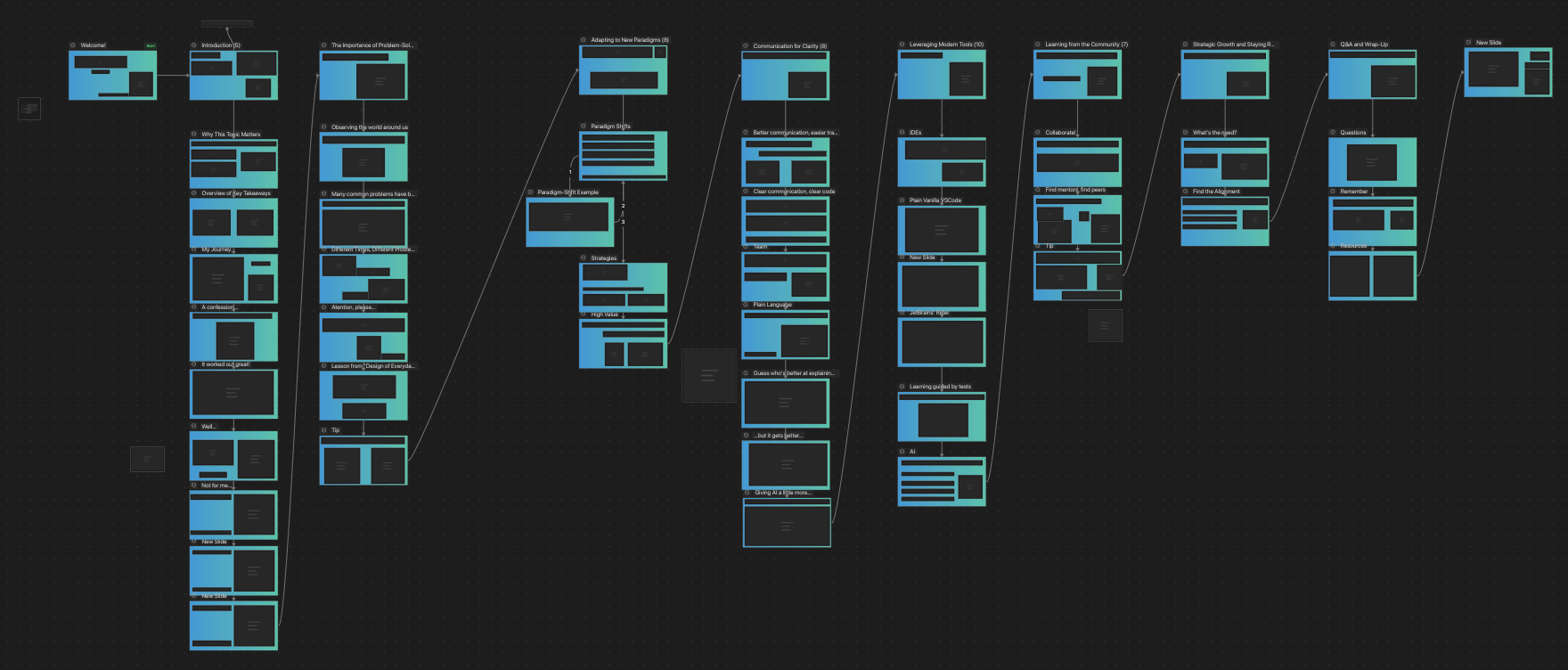
I have used the Advanced Canvas plugin in Obsidian. This plugin turns the canvas feature into a presentation slide deck.
A canvas file stores its content as JSON data. I decided to return to the chat in ChatGPT, where the presentation outline was created, and tell it to generate a Canvas file. This was my prompt:
I use the Advanced Canvas plugin to create presentations in Obsidian. Create the json content for an Obisidian Canvas containing 1 slide per item in the outline above.
ChatGPT created a valid Canvas. However, it was not compatible with the Advanced Canvas plugin. I then changed my prompt:
That content does not represent what the Advanced Canvas plugin needs to turn the canvas into a presentation. Use the json below as an example. Notice there’s a “start node” and connections between slides (such as Slide 1 and Slide 2, fromNode and toNode).
The result was better, but I wasn’t happy with the dimensions of each slide and their placement on the canvas, so I asked for the changes with this prompt:
Every slide (represented by nodes of type “group”) should have a width of 1200 and a height of 675. Place each group horizontally on the canvas, from left to right.
The result gave me all I needed to take over and continue developing my content.
I’ll quickly summarize how I got from that to the final content I delivered.
The horizontal spine of the presentation in front of me allows me to think through how I want to tell the story.

I add notes I think of as “legs” supporting that story. At this point, it looks like a centipede.

Next, I turn points from those notes into slides and see how deep each section is going.

Let me take a quick detour here.
We have just started a new experiment at Improving Houston called “Thought Leadership: Build in Public.” It’s a 30-minute weekly meeting where anybody working on a new talk or written content can join, do their work, and request help or feedback.
With my presentation skeleton ready, I leveraged that meeting to run those slides by an Improver and get some feedback, which led to me finishing the content and preparing it for its debut.
The first time I presented, it went well. The attendees enjoyed it and gave me positive feedback, so I’ll continue refining the content and delivering it to more audiences.