I’ve been thinking about a question I’m hearing more often lately—sometimes out loud, sometimes between the lines.
If AI can write software, and the software “works”… does it really matter how the code reads?
It’s tempting to say no.
Because if the problem is solved, the value is delivered, and the user is happy… what’s left to worry about?
But I keep coming back to the same answer I’ve used for most of my career:
It depends what kind of problem we think we’re solving.
The “one-off” exception
There are absolutely situations where code quality matters less.
A one-time data fix
A temporary script
An emergency workaround to keep the business moving
A spike or proof-of-concept that we already expect to throw away
If we’re truly going to throw it away, then sure—optimize for speed and learning.
In those moments, the bar is: Did we solve the immediate need safely enough to move on?
But here’s the catch.
Most software doesn’t stay a one-off.
The thing we “just needed for now” becomes:
a reusable utility
a core workflow
a dependency
a pattern we copy into other parts of the system
And once it sticks around, code quality becomes a must-have.
It becomes the cost of doing business.
“But humans won’t read it—AI will”
This is where the conversation gets interesting.
A newer version of the argument goes like this:
If AI is going to work with the code anyway… maybe humans won’t need to read it.
I get the impulse.
But in practice, I’m seeing the opposite:
Good code helps AI do better work.
Not because AI needs “pretty” code.
Because AI—like humans—works from the signals we give it.
And code is full of signals.
Tests and naming are signals
When a system has:
clear tests that describe behavior
method and variable names that reflect intent
domain language that matches the business
…an LLM has a much easier time building an accurate mental model of the system.
That’s the same reason humans do better work in well-written codebases.
When I walk into a messy system, I spend time translating.
What does this variable really represent?
Why does this method exist?
Which edge cases matter?
What’s the business rule hiding inside this loop?
An AI agent has to do that translation, too.
If the only thing it can see is “computer language,” it will describe the system at the computer level.
But if the code and tests are written closer to natural language—closer to business intent—then the system can reason at that level instead.
The difference between describing the “how” and the “why”
Here’s a simple example of what I mean.
If the code is messy, the best summary you’ll get from an LLM is something like:
“This function iterates through an array of integers and filters values…”
That might be technically correct.
But it’s also useless for a non-technical stakeholder.
If the code is written with intent, the summary can shift to something like:
“This logic scans a customer’s open invoices and selects the ones eligible for payment…”
That’s the same algorithm.
But now it lives in the world the business actually cares about.
And that’s the world where good decisions get made.
Comments aren’t the fix—names are
One of the easiest traps (especially with AI-generated code) is:
write procedural code
then paste a few comments on top
Comments help.
But comments don’t create structure.
The habit I trust more is the one we’ve been practicing for decades:
turn comments into names
If you feel the urge to write a comment like:
“// Validate the customer’s eligibility”
That’s a hint.
Make it a method.
ValidateCustomerEligibility()
Give it a name that expresses intent.
And now both humans and AI have something sturdy to hold onto.
Guardrails for AI-written code
So when I think about “AI writing software,” I don’t think the answer is:
Let it generate code, and we’ll just ship whatever works.
I think the answer is:
Let it generate code inside the same guardrails we expect from humans.
Guardrails like:
Use domain language (DDD’s ubiquitous language)
Write tests that describe behavior and edge cases
Prefer intention-revealing names
Keep functions small enough to hold in your head
Optimize for the next change, not just the current one
And this last part is where I’ve seen the most significant payoff:
When user stories are written for humans, and code is written to match those stories, AI agents can do better pull request reviews.
Not “code coverage” reviews.
But feature coverage reviews.
Value coverage.
They can spot:
what wasn’t implemented
what scenarios are missing
what tests don’t reflect the story
what assumptions aren’t written down anywhere
That’s a higher level of assistance than “fix my syntax.”
And it’s only possible when we give the AI clean signals to work with.
The real question
So maybe the question isn’t:
Does code quality matter when AI writes software?
Maybe the better question is:
What kind of future do we want this code to have?
If it’s disposable, fine.
But if it’s going to live—if it’s going to evolve—then quality is still the thing that makes change affordable.
Takeaway I’m sitting with: Code quality isn’t just for humans. It’s the set of signals that helps both humans and AI understand what a system is really trying to do—and that understanding is what makes the next change safer, faster, and more aligned with the value we meant to deliver.
Over the last few weeks, I’ve been revisiting old posts from my blog’s early years and recording videos reflecting on what I find in them. It has been a fascinating way to reconnect with past versions of myself—what I was learning, what I was struggling with, and what I was excited about.
This chapter of the journey covers May through September of 2007, and it turned out to be a surprisingly rich period. A lot was happening for me at the time: speaking at conferences, learning new tools, experimenting with productivity, and simply trying to keep up with the pace of technological change.
Speaking at Advisor DevCon and Other Events
Back then, Advisor DevCon was the conference for Visual FoxPro developers. For years, I had only read about it from afar in Brazil, thinking it was way out of reach. So getting invited—not only to attend, but to speak—was a milestone. I had been writing a lot of articles to help FoxPro developers ease into .NET, and those contributions opened doors for me.
Around the same time, I was also speaking at regional events like the Dallas Code Camp, Houston TechFest, and user groups. Many of my most popular sessions were on fundamentals: object-oriented programming in .NET, design patterns, and productivity tips. It’s interesting how topics we sometimes think are “basic” are often the ones people need most.
How I Kept Up with Technology
This period captures how I tried to keep up with the fast-moving .NET world—something that still feels just as relevant today (but now, with AI tools).
My primary sources at the time:
Podcasts – DotNetRocks and Hanselminutes were staples.
Blogs – I consumed a ton of blog content, often loading posts onto my Pocket PC so I could read them anywhere.
Webcasts – The predecessor to today’s YouTube tutorials.
Study groups – Not for certification, but to learn from my coworkers and become aware of pieces of .NET I wasn’t using yet.
Brown bag meetings – Quick, informal demos with coworkers. These eventually evolved into the Virtual Brown Bag years later.
Even then, I wasn’t trying to follow everything. I was looking for what helped me solve real problems in the moment. That hasn’t changed.
Tools and Experiments
2007 was full of experimentation with tools and techniques.
Some highlights:
FxCop taught me a ton about .NET by analyzing my code and pointing to parts of the documentation I had never read.
MSBuild, Team System, and build automation were becoming part of my workflow.
ReSharper and CodeRush were both part of my setup because each had strengths that the other didn’t.
Static analysis rules, custom tooling, and diving into IL (intermediate language) were things I was investing in.
Smell# – a silly idea I blogged about, imagining a 4D experience where code would “emit” a smell based on its quality. But behind the joke was a real tool—RefactorPro—showing cyclomatic complexity in Visual Studio.
Productivity and Shortcuts
Even in 2007, I was talking about productivity. The details have changed over the years, but the principles haven’t.
Learning keyboard shortcuts—OS, IDE, and cross-application—was something I preached often. It still surprises me how many developers use an IDE daily yet don’t learn the shortcuts for the actions they perform most often. One shortcut a day can add up to substantial time savings.
Life on the Road
That year, I was also traveling a lot for conferences, user groups, and client work. I used that time to:
listen to podcasts,
practice guitar with a travel-friendly instrument,
watch movies on my Pocket PC,
and tinker with code until my laptop battery died.
It was a different era of technology, but the routine feels familiar—finding small spaces to learn, create, or unwind.
Wrapping Up
Looking back at this slice of 2007 reminded me how much I was experimenting, learning, and sharing. Some tools are gone, some practices have evolved, but the themes remain the same. The curiosity, the continual learning, and the desire to share what I learn with others—that’s the thread that connects everything.
There’s more to revisit, so I’ll continue the journey in the next installment.
A few months ago, my blog turned 20. To celebrate, I published a short book titled 20 Lessons from 20 Years of Blogging, available on LeanPub. That milestone also inspired me to start a new series: revisiting my old posts, from the very beginning, and reflecting on what I was thinking and learning at the time.
This post covers the first stretch of that journey — 2005 and 2006 — the earliest entries on my blog.
🎥 Watch the video: I recorded my live reflections on these early posts — unscripted, personal, and full of memories.
Getting Started
My very first post in August 2005 was simple: “Hey, I’m just getting started on this blog.” I even planned to keep two blogs—one for software development and another for personal topics. (That second one didn’t last long!)
The first post with content? A short rant titled “What’s up with zero-based arrays?” Twenty years later, I still stand by it. Some things never change.
I often meet people who hesitate to start blogging because they don’t know what to say or think they don’t know enough. But looking back at those first posts reminds me: it’s okay to start messy. Just share your thoughts, even if you don’t have all the answers yet (hint: we’ll never have).
Learning Out Loud
Those early entries also show my curiosity about C#, the using block, and how to manage resources properly. The writing was rough, my English was still evolving, but I was learning out loud. And that, more than anything, kept me going.
People often say I’ve been consistent for two decades. But in reality, I skipped months at a time back then. I posted three times in August, nothing in September, once in October, then disappeared until March. Consistency didn’t come first — starting did.
The MVP Years
In October 2005, I wrote about receiving my Microsoft MVP Award for the fourth year in a row. That recognition was special. It meant the work I was doing to help the developer community was making a difference.
The following year, in October 2006, I received it again — my fifth consecutive year. By then, I had transitioned from Visual FoxPro to C#, helping other developers do the same. Those early years of sharing and teaching shaped much of who I am today.
From Regex to LINQ
Some of my posts were simple frustrations, like struggling to understand regular expressions. Others documented technical shifts — like my talks about .NET tools such as FXCop and TestDriven.NET.
In April 2006, I gave a talk on C# 3 and LINQ. Instead of focusing on LINQ queries, I explored the foundational language features that enabled LINQ: extension methods, type inference, anonymous types, and lambdas. That focus on fundamentals still defines how I like to teach.
When Scott Guthrie Commented on My Blog
One of my favorite early stories: I wrote a post complaining about how slow ASP.NET 2 builds were. A few days later, Scott Guthrie himself — the .NET guy at Microsoft, now Executive VP of Cloud & AI — left a comment offering to help troubleshoot my project.
Can you imagine that? Those were the golden days of blogging, when conversations like that could happen directly in your comment section.
When the Geniuses Talk, I Fall Asleep
Near the end of 2006, I wrote a more extended reflection titled “When the Geniuses Talk or Write, I Fall Asleep.” It came from years of teaching and mentoring developers. I’d met so many experts who made topics sound more complex than they needed to be. I didn’t want to be that kind of teacher.
People had told me, “You explained object-oriented programming in three hours better than my professor did in six months.” I didn’t go to college, but I learned by doing and by helping others learn. That’s what made it stick.
Life Beyond Code
Not all my posts were about programming. In December 2006, I wrote about upcoming gigs with my band — complete with photos from metal rehearsals and studio sessions. Looking back at those reminds me how the blog has always been a reflection of my whole self, not just the developer part.
Wrapping Up
So that was my first full year of blogging: from zero-based arrays to MVP awards, from regex headaches to rock band gigs. The through-line? Curiosity, learning, and a willingness to share the journey publicly.
Consistency came later. But what mattered most was showing up and hitting publish.
🎥 Watch the full reflection video to see me walk through these posts in real time.
When I discuss testing, I prefer to frame it not as a burden, but as a reason to smile. Testing well—unit, integration, and end-to-end—means fewer late-night emergencies, fewer trips back to the drawing board, and more confidence that what we deliver actually works. That’s worth smiling about.
Which Tests to Write?
One of the first questions teams often ask is: Which tests should we write? Should they be for the backend, the frontend, or both? And how much of each? The truth is, a healthy mix matters.
I usually describe it in terms of the testing pyramid:
Unit tests form the foundation. They’re small, fast, and easy to write. In one project, nearly 87% of our ~3,000 tests were unit tests.
Integration tests make sure the pieces work together. They’re slower, but necessary; if the parts don’t play nicely together, the system doesn’t work.
End-to-end tests validate complete workflows, the way a user experiences them. Even if everything else works, if the workflow fails, the business fails. We keep these focused, covering critical paths rather than every edge case.
That distribution—lots of unit tests, some integration tests, and a handful of end-to-end tests—keeps things balanced.
Since running those analyses a few years ago, I’ve changed, so the focus is no longer on unit vs. integration tests. I’ll write about that in another post.
Why We Smile
We smile because testing done well changes the way we work:
Fewer surprises: We rarely need to throw away weeks of work because stakeholders say, “That’s not what we wanted.” Our conversations, scenarios, and tests keep us aligned.
Shared understanding: By writing tests in a Given-When-Then style, non-technical folks can help us validate that we’re building the right thing.
Confidence to change: Clean, well-structured tests give us the safety net to refactor and improve our code without fear of breaking things.
On one team, we grew our test suite by more than 50% over three months, and yet the distribution across unit, integration, and end-to-end remained consistent. That told me we weren’t just adding tests for the sake of coverage; we were building them into the process naturally.
What About Code Coverage?
People often ask, ‘What about code coverage?‘ My answer: It’s not the point. Code coverage numbers can be gamed; tests without assertions still “increase coverage.” What matters is feature coverage: every user story has automated tests to verify it. That’s the measure that makes business sense. And as it turns out, this shift in perspective still guarantees we have high code coverage.
The Process Matters
The real magic comes from how testing is woven into the process:
Backlog refinement brings clarity of purpose (“In order to… As a… I want to…”).
Sprint planning expands those stories with scenarios and Given-When-Then examples.
Tasks always include tests: front end, back end, integration, and end-to-end.
Design sessions define the contracts so frontend and backend can work in parallel.
End-to-end tests validate the actual workflows after features are demoed and approved.
This process means testing isn’t an afterthought. It’s part of how we build from the very beginning.
Wrapping Up
Testing isn’t just about preventing bugs. It’s about creating confidence, clarity, and collaboration. It’s about freeing teams to focus on solving the right problems instead of firefighting the wrong ones. And when you see your system working smoothly, your users happy, and your stakeholders nodding in approval, you can’t help but smile.
We test, therefore we smile.
Here’s a complete recording of a presentation I gave on this topic:
For many developers, “user experience” has long been synonymous with aesthetics: buttons that pop, colors that please, interfaces that shine. But if you’ve ever built software that looked polished on the surface while frustrating the people who relied on it, you know there’s a bug in that assumption.
UX is not about making things pretty. It’s about making them pretty useful.
Temple Grandin puts it bluntly in Visual Thinking:
Even the most superb, beautiful mathematical code is not going to be successful if the user interface is a cluttered mess that is difficult to use. No user is the least bit interested in hour-long classes on how to use a program.
Why Developers Should Care About UX
After 30 years of writing software, I can’t recall a single project where messy UX coexisted with beautiful code. The two tend to mirror each other. A cluttered interface usually hides cluttered logic. Clean, thoughtful UX often leads to clean, thoughtful code.
That matters because UX is more than a layer of polish; it’s a catalyst. A good experience:
Leads to happier users (and fewer support calls).
Makes features easier to implement.
Lowers the barrier to writing automated tests.
Encourages cleaner code structures.
Anticipate and Compensate
One of the most potent lessons I’ve learned is this: anticipate and compensate.
When we write if statements or rules engines, we’re encoding questions: Is the fiscal year locked? Does the customer have pending payments? Those same questions are in the user’s head. If we hide the reasoning behind a disabled button, we force the user to guess. Or worse, call customer support, which may require us to call them in return.
Instead, surface those rules. Show the user why the button is disabled. Give them the same clarity you’d want if you were sitting next to them, debugging.
Speak the User’s Language
Words matter. For years, I built screens with Cancel, Delete, Save buttons. Then I realized: users don’t talk like that.
Customers cancel orders; they don’t “delete” them.
A salesperson doesn’t tell a customer, “I’ll save your order.” They say, “I’ll place your order.”
Dismissing a dialog isn’t the same as canceling a transaction.
Using business language reduces confusion and builds trust. It shows respect for the world users live in, not the technical jargon we hide behind.
Build for Tasks, Not Just Data
Too many apps still treat UX as a way to navigate giant data grids. But real users don’t want “all the sales orders.” They want this customer’s open orders. They don’t want every field on a form; they want to complete the one task in front of them, with the information they have right now.
That shift, from CRUD screens to task-based UIs, simplifies life for users and developers alike. It makes the UI easier to navigate, the code easier to test, and the intent behind features much clearer.
Collaborate Across Roles
Most projects I’ve worked on didn’t have dedicated UX designers. The burden fell on developers to make UX decisions, often without training. Even when designers were involved, poor collaboration often blunted their impact.
The better we developers understand UX principles, the better we can:
Make good decisions when we don’t have designers.
Collaborate productively when we do.
Closing the Gap
At its core, UX is about empathy. It’s about remembering that our software is just a tool in someone else’s messy, noisy, stressful day. They’re not thinking about “loading data from the backend.” They’re thinking, ‘These options don’t work for me. Do you have other options?’
When we anticipate questions, use the correct language, and design for real tasks, we close the gap between what software does and what people need.
So the next time someone says UX is about “making things look pretty,” remember: it’s not about pretty. It’s about pretty useful.
Here’s a full video of a presentation where I go over this topic:
Code reviews are one of my favorite practices in software development, but I’ve also seen how easily they can go wrong. Too often, a review turns into nitpicking or a power play. At their best, though, reviews help us learn together, improve the code, and strengthen the team. That’s why I approach them with two guiding principles:
Do no harm.
Do good.
It’s About People First
When you’re reviewing code, you’re not just looking at lines of C#, JavaScript, or Python; you’re engaging with a teammate. That means understanding their background, their skill level, and their perspective. A code review should never be about proving who’s smarter. It’s an opportunity to connect, coach, and learn from each other.
Sometimes that even means meeting the team where they are. If the most “clever” version of the code makes it harder for others to understand and maintain, then it’s not the best solution for the team.
Start With the Tough Stuff
Whenever I join a new project, I ask: Show me the nastiest part of the codebase. The invoicing module, the county tax calculator, that 5,000-line class nobody dares touch; those are goldmines for learning. By starting with the hardest, messiest code, I get a baseline for where things stand and a chance to demonstrate how to make progress, one small refactor at a time.
The key is to move iteratively. Extract a variable. Rename something for clarity. Pull a repeated block into its own method. And document your thought process along the way so others can see not just the what, but the why.
Separate the What from the How
One of the biggest problems I see in messy code is repetition: copy-paste blocks, duplicated strings, or long if/else chains. The fix often comes down to a simple principle: separate the what from the how.
Instead of repeating code, define what needs to be done, and then determine how to process them in one place. The result is cleaner, easier to read, and much easier to change later. See an example here.
Teach Along the Way
Code review isn’t just about cleaning up syntax or catching bugs; it’s a chance to teach and learn. Show others how to use refactoring tools in the IDE. Explain why a ternary operator works better in one place but not in another. Share the design patterns that help avoid endless if/else chains or god objects. The point is not to impose your style, but to coach the team forward.
And don’t forget tests. Bad tests can be just as harmful as bad code. Copy-pasted test cases with meaningless differences give a false sense of security. Instead, write tests that clearly express the intent and help others understand why a particular case matters.
Documenting Refactorings
When I clean up code, I document the journey. Sometimes that’s as simple as taking diffs and screenshots with arrows explaining changes. Other times, I’ll create a short screen-capture video. This is a way of leaving a learning trail for the team so they can follow the thinking, not just the result.
Closing Thoughts
Clean code isn’t about perfection. It’s about making things a little better, every time you touch them, while respecting the people who will read, use, and extend that code after you.
So remember:
Rule #1: Do no harm. Don’t use reviews to show off or put others down.
Rule #2: Do good. Use reviews to coach, to share, and to learn together.
I’ll be the first to admit: I don’t always write great code. None of us does. But if we approach reviews with humility and a mindset of improvement, then every messy line is an opportunity to grow, both for the code and for the team behind it.
Here’s a recording of my “Code Review: I Mean No Harm!” from years ago, which includes many examples from past code reviews.
This past week, I had the privilege of giving a brand-new talk with a title that captures a question on many people’s minds: Will AI take your job—or join your standup? As someone who has spent decades working at the intersection of technology, Agile, and software craftsmanship, I wanted to explore how AI can move beyond being a shiny tool and instead become a teammate that helps us work smarter.
AI in the Sprint Room
This talk is rooted in my reflections on over two decades of adopting the values and practices of Agile, Scrum, Lean, and Extreme Programming, exploring how AI might be applied, and documenting my experiences to share with others.
A recent sprint retrospective provided me with a perfect example to illustrate these ideas. After wrapping up that conversation and just about to start our usual “lessons learned” discussion, my teammate suggested, “Why don’t we ask our AI assistant what it learned this sprint?” Brilliant! So I prompted it: “This is the last day of our two-week sprint. We are in our lessons learned session. What have you learned this sprint?”
The response blew us away. It surfaced points that mirrored my own coaching: project context matters, testing strategies are crucial, documentation saves time, and domain-driven design is essential. My teammate even commented that it sounded just like me. In that moment, it was clear: AI wasn’t replacing us, it was reflecting our values back to us and sharpening our focus.
From Tools to Teammates
One big takeaway from my journey so far is that the specific AI tool matters less than how you use it. I’ve used ChatGPT, Cursor, JetBrains Rider’s AI—you name it. All of these tools are now well-suited for both visual thinkers (like me) and verbal ones. The key is understanding what problem you’re trying to solve and picking the tool that helps you get there. And suppose you can’t yet articulate what the problem is. In that case, you can also collaborate with AI tools to find it out (as an accelerator, providing alternatives, but never replacing conversation and human collaboration).
Much like a woodworker doesn’t rely on just one chisel, but rather on many tools for different situations, we need to view AI as an evolving toolbox. Don’t get stuck in debates about which tool is “best.” Instead, ask: What am I using it for? That mindset frees you to experiment.
Conversations, Not Just Meetings
Agile has always been about conversations. Scrum events—planning, daily scrums, reviews, retrospectives—are only valuable if people are actually talking, collaborating, and solving problems together. AI can amplify those conversations. For example:
Discovery: Record stakeholder sessions, transcribe them, and use AI to draft user stories from real conversations.
Prototyping: Generate quick prototypes during a meeting so stakeholders can react to something tangible.
Testing: Translate acceptance criteria directly into executable tests that anyone on the team can easily understand and read.
Sprint Reviews: Craft presentations that focus on business value (e.g., “we reduced onboarding time by 30%”) rather than technical trivia (e.g., “we added a button”).
The shift is subtle yet powerful: AI helps maintain focus on outcomes, not outputs.
Revisiting Old Practices with Fresh Eyes
As I revisited Extreme Programming practices—pair programming, test-driven development, whole-team ownership—I realized something: working with AI is like pair programming with the most eager junior developer you’ve ever met. You need to provide it with context, constraints, and guidance. Without guardrails, it will happily “do it” and wander off track. But if you collaborate, critique its plans, and teach it your standards, it accelerates your work while reinforcing team values.
What AI Can’t Do (Yet)
It’s equally important to highlight what AI cannot do. It doesn’t read body language, sense unspoken tension, or empathize with a frustrated stakeholder. That’s still on us. The human role is irreplaceable when it comes to trust, empathy, and leadership.
A Call to Experiment
If there’s one thing I hope people walk away with, it’s this: pick one place in your process and experiment with AI. Try using it for user stories, test scaffolding, or sprint review presentations. Document what you learn. Measure the impact. Share with your team. Grow your AI literacy together.
Do this sprint after sprint, and see the results compound over time. Teams won’t ask “Will AI take my job?” anymore. They’ll ask, “How else can AI help me bring more value to my job, causing a higher positive impact?” That’s the shift that matters.
Here’s the video if you’d like to have this content in more detail.
In reflecting on past projects, I’ve noticed a recurring contrast in how developers respond when shown a functional application. Given just enough context to understand what it does, and then shown both the finished product and the code, you can quickly see where their attention goes first.
Some gravitate immediately toward the code — including formatting, naming conventions, performance details, and the underlying technology choices, such as programming languages, frameworks, and libraries. Others focus on the solution itself: Does this actually address the problem we set out to solve?
Lessons From Experience
I’ve seen this pattern across decades of technology shifts — FoxPro vs. Visual Basic, .NET vs. Ruby on Rails, the rise and fall of frontend frameworks, and now AI-assisted development. Some developers get caught up in whether the syntax aligns with their personal style or whether it utilizes the latest tools. Others start with a simpler, more fundamental question: does it actually help the people it’s meant to serve?
Often, the code-first group never asks the most important question: Does this move us closer to solving the problem? I’ve seen beautiful code that solved nothing, and quick, imperfect prototypes that delivered immense business value.
Why the Order Matters
Focusing on the solution first doesn’t mean ignoring code quality. It means sequencing your attention:
Validate the outcome. Does it solve the problem?
Refine the implementation. Once you know it’s worth building, then make the code great.
When developers skip step one, they risk perfecting something no one needs.
A Developer’s Reflection
It’s easy to take pride in syntax. It’s tangible, it’s ours, and it reflects our craft. But the craft exists to serve a purpose. Stakeholders don’t thank you for perfect indentation; they thank you for solving their problem.
The real skill is balancing both instincts — the love for elegant code and the discipline to ask what Seth Godin calls in This is Strategy:
“Better”, the heart of your strategy. Better for who? When we lack the empathy to imagine someone else’s “better”, we’re on the road to frustration.
If you can’t imagine someone else’s “better,” you might be chasing perfection that doesn’t matter.
The Takeaway
Both perspectives are valuable. But the order matters. Doing the right thing first, then doing it right, gives you the best chance of delivering something that lasts.
Next time you see a new solution, notice your instinct. Do you dive into the code, or do you try it to see if it solves the problem?
That moment reveals a lot — not just about the project, but about how you approach your craft as a developer.
At a Renaissance Festival years ago, I found myself once again drawn to the same booth I visited every year—the glassblower’s workshop. People would gather early just to watch someone work. Not because they wanted to learn how to do it, but simply to witness the transformation. From a hot, gooey mess to a delicate piece of glass art, shaped with care, precision, and experience. When people bought a piece, they weren’t just buying decor—they were buying a story.
And that got me thinking about software craftsmanship.
In a recent lightning talk, I explored the idea: What would it take for our work as software developers to be admired like that?
Are We Seen as Craftspeople?
It’s easy to think of software development as purely functional. Build the thing, ship it, move on. But there’s a deeper layer—when done well, software can be craft. The kind of work that invites admiration, pride, and storytelling.
Do your users or clients ever talk about how you built something?
Do they show it off?
Do they tell others about your care, your skill, your process?
If not… what could we be doing differently?
Let Them See You Work
One lesson from the glassblower: people admire the outcome more when they see the process. As developers, we tend to hide that messy middle—the sprint planning, the modeling sessions, the back-and-forth of refining features.
But what if we invited stakeholders in?
Let them see the sketches. The domain conversations. The dead ends that turn into insights. The tools we choose, the reasons we change our minds, the care we bring to code. Show them the gooey mess and let them witness it harden into something beautiful.
Documenting the Journey
This talk also touched on a few personal milestones: launching a community magazine, writing blog posts, speaking at conferences. What all of these had in common was documentation. Writing things down as I work. Recording what I’ve learned. Reflecting on the edges of my understanding.
It’s easy to forget how much we’ve grown until we look back at our own words. Sometimes I reread an old post and think, “Oh yeah—I struggled with that too.” That forgotten knowledge can become a lifeline for someone else, or a reminder for future you.
Two Roads to Craftsmanship
Some developers start with soft skills and grow their technical chops over time. Others start deeply technical and gradually develop the empathy, communication, and leadership that make them truly impactful. I was in the latter camp.
The point isn’t which path you start on. It’s that both are valid routes to craftsmanship.
When Software Sparks Stories
The talk ends with a reminder: the most important thing isn’t the tech, the tooling, or the documentation. It’s how the user feels.
If someone loves using your software, they’ll tell others. Not just about what it does—but about how it was made, and who made it. That’s the moment when your work stops being a commodity and starts becoming something more.
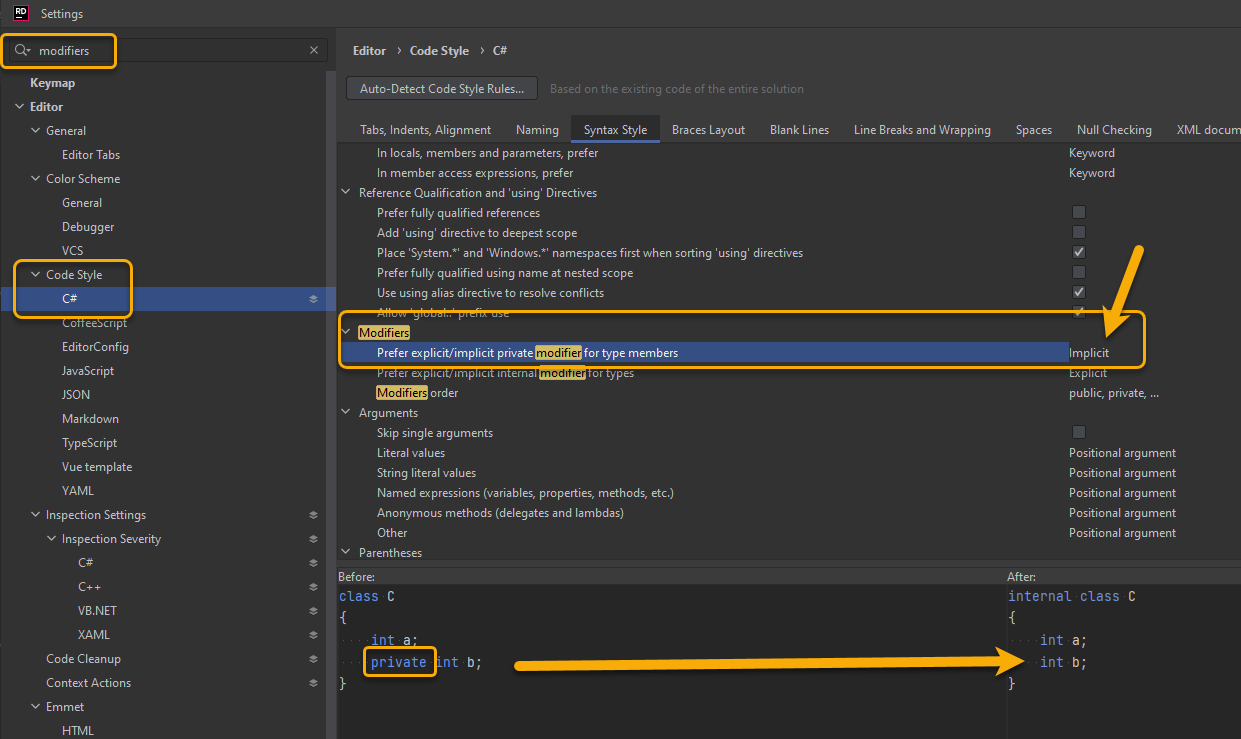
I prefer NOT to see the “private” keyword in C# code. As a quick update to that post, here’s how to set up JetBrains Rider to not add “private” when it creates code, and also to remove it when using its “Reformat and Cleanup Code” feature: